> ## Documentation Index
> Fetch the complete documentation index at: https://docs.logical.io/llms.txt
> Use this file to discover all available pages before exploring further.
# Privacy
> Learn how Logical handles your data and privacy.
Privacy and security are at the core of Logical. We believe in being transparent about how we handle your data and how we use it.
## How Your Data is Handled and Stored
**No user data is stored on Logical servers.** All your information, including Knowledge Bases, to-do items, and application data, remains exclusively on your local device.
The only time data leaves your device is when it's sent to third-party LLM service providers for processing your queries and requests. This data transmission is governed by our privacy policy and only includes the minimal information necessary to provide you with relevant assistance.
## Required Permissions
Logical needs specific system permissions to function properly. These permissions are requested when you first launch the application and represent the minimal access required for core functionality.
### Core Permissions
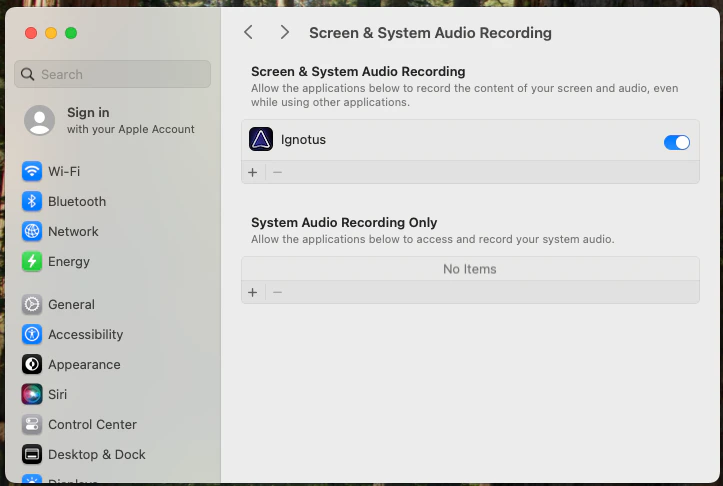
**Purpose**: Allows Logical to capture and analyze your screen content to understand what you're working on.
**What it enables**:
* Context-aware assistance based on visible content
* Sentry Mode monitoring
* Cross-application understanding
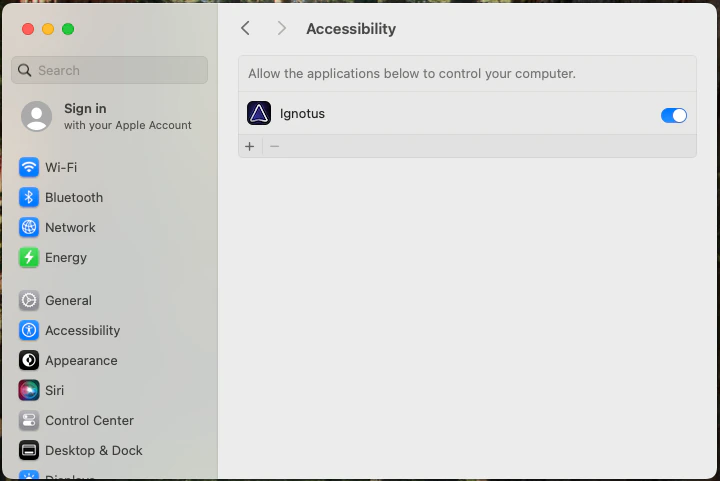
 **Purpose**: Allows Logical to detect focus changes, window switching, and other important system events.
**What it enables**:
* Automatic context switching between applications
* Focus monitoring for temporary projects
* Enhanced application integration
**Purpose**: Allows Logical to detect focus changes, window switching, and other important system events.
**What it enables**:
* Automatic context switching between applications
* Focus monitoring for temporary projects
* Enhanced application integration
 ### App-Specific Automation Permissions
Beyond the core permissions, Logical may request additional automation permissions on a per-application basis. These are only requested when Logical detects that an application could provide richer context or action support.
### App-Specific Automation Permissions
Beyond the core permissions, Logical may request additional automation permissions on a per-application basis. These are only requested when Logical detects that an application could provide richer context or action support.
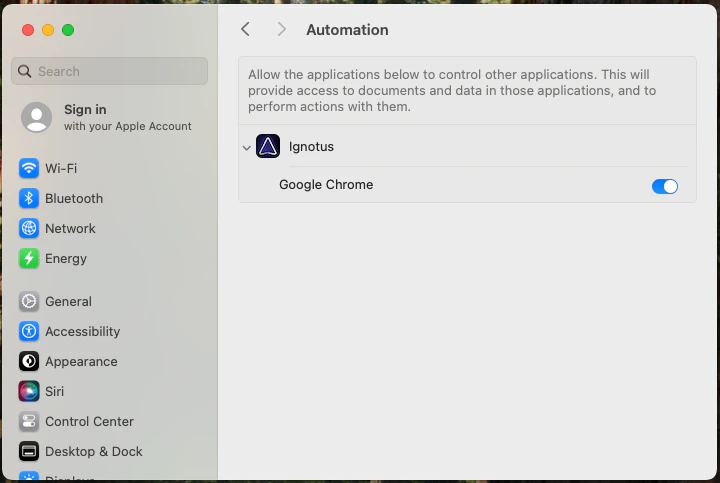 **Examples include**:
* Automating form filling in web browsers
* Extracting structured data from documents
* Performing actions in productivity applications
These additional permissions are entirely optional and only enhance Logical's capabilities with specific applications. Core functionality works without them.
### Browser Integration Permissions
For optimal integration with web applications (especially email services like Gmail or Outlook Online), you should enable **"Allow JavaScript from Apple Events"** in your browser settings.
Navigate to **Settings > Privacy and Security > Site Settings > Additional Content Settings > JavaScript from Apple Events** and enable it for enhanced email and web app integration.
**Examples include**:
* Automating form filling in web browsers
* Extracting structured data from documents
* Performing actions in productivity applications
These additional permissions are entirely optional and only enhance Logical's capabilities with specific applications. Core functionality works without them.
### Browser Integration Permissions
For optimal integration with web applications (especially email services like Gmail or Outlook Online), you should enable **"Allow JavaScript from Apple Events"** in your browser settings.
Navigate to **Settings > Privacy and Security > Site Settings > Additional Content Settings > JavaScript from Apple Events** and enable it for enhanced email and web app integration.
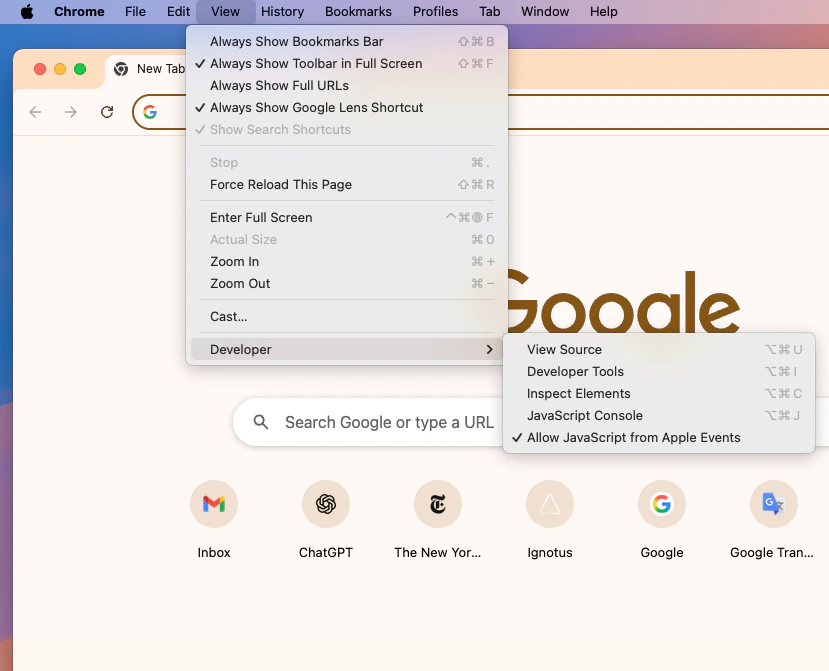 In Safari preferences, ensure that the equivalent automation permissions are enabled for web applications to work seamlessly with Logical.
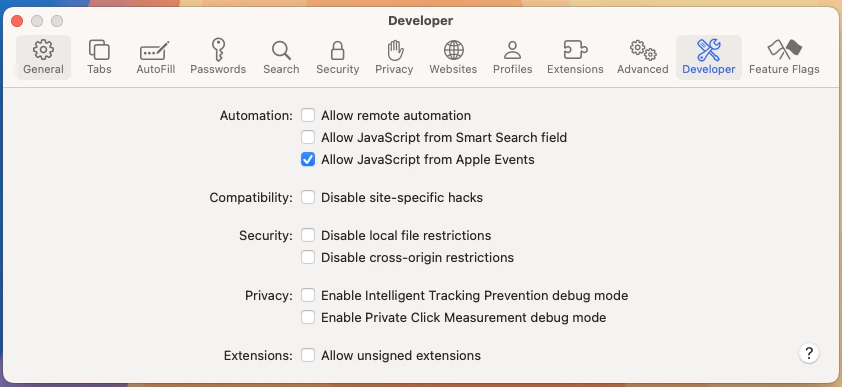 This permission allows Logical to better understand and interact with web-based applications, particularly for email management and form automation.
## App and Web Filters
Users can filter out arbitary apps and websites from monitoring just by clicking the hide button. This prevents Logical from analyzing content from those applications or web pages.
## Privacy Policy
Our complete privacy policy, including detailed information about data handling and third-party integrations, can always be found at [trylogical.ai/privacy](https://trylogical.ai/privacy).
## Managing Your Privacy
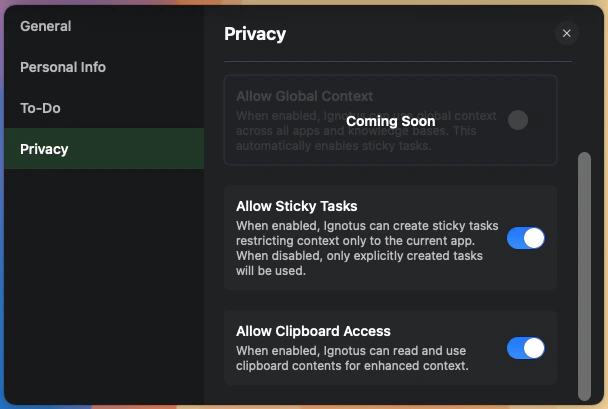
You can review and modify your privacy settings at any time through the Logical preferences panel. This includes:
* Enabling or disabling specific features
* Managing app-specific permissions
* Controlling data sharing preferences
This permission allows Logical to better understand and interact with web-based applications, particularly for email management and form automation.
## App and Web Filters
Users can filter out arbitary apps and websites from monitoring just by clicking the hide button. This prevents Logical from analyzing content from those applications or web pages.
## Privacy Policy
Our complete privacy policy, including detailed information about data handling and third-party integrations, can always be found at [trylogical.ai/privacy](https://trylogical.ai/privacy).
## Managing Your Privacy
You can review and modify your privacy settings at any time through the Logical preferences panel. This includes:
* Enabling or disabling specific features
* Managing app-specific permissions
* Controlling data sharing preferences