> ## Documentation Index
> Fetch the complete documentation index at: https://docs.logical.io/llms.txt
> Use this file to discover all available pages before exploring further.

# Additional Features

> Beyond the core functionality, Logical offers several additional features designed to streamline your workflow and boost productivity.

## Clipboard History

Logical's Clipboard History feature provides intelligent management of your copied content, making it easy to access and reuse previously copied items.
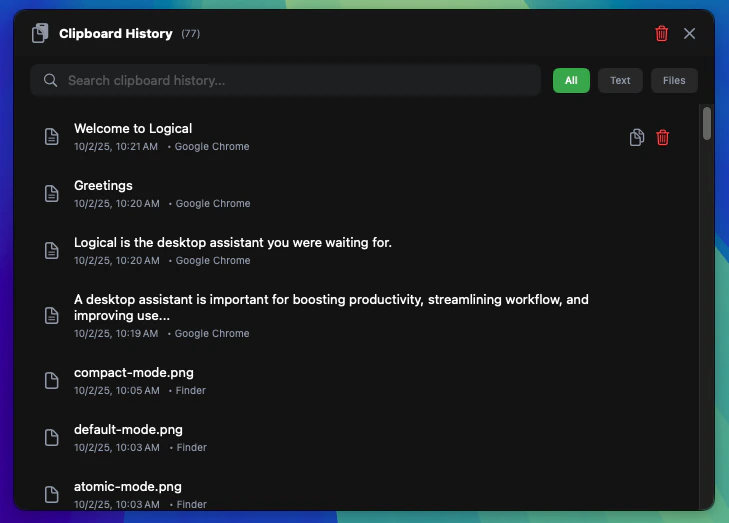
<Frame caption="Clipboard History interface showing organized copied content.">
  <img src="https://mintcdn.com/logical-257522b6/5VAMFRe1sL8A7hXh/images/additional-features/clipboard-history.png?fit=max&auto=format&n=5VAMFRe1sL8A7hXh&q=85&s=24022379333391fec6af2042ca96eb3f" alt="Logical Clipboard History showing categorized clipboard items with search functionality." width="729" height="523" data-path="images/additional-features/clipboard-history.png" />
</Frame>

## Voice Commands

Control Logical hands-free with natural voice commands. Simply speak your requests and Logical will understand and execute them across your applications.


<Frame caption="Voice Commands initialization and interface.">
  <img src="https://mintcdn.com/logical-257522b6/5VAMFRe1sL8A7hXh/images/additional-features/voice-command-init.png?fit=max&auto=format&n=5VAMFRe1sL8A7hXh&q=85&s=b7ebb0db0f8730ea4cb86f6d2481c5be" alt="Logical Voice Commands setup and activation interface." width="655" height="134" data-path="images/additional-features/voice-command-init.png" />
</Frame>

<Frame caption="Voice Commands in action with speech recognition.">
  <img src="https://mintcdn.com/logical-257522b6/5VAMFRe1sL8A7hXh/images/additional-features/voice-command.png?fit=max&auto=format&n=5VAMFRe1sL8A7hXh&q=85&s=db59bbeb90869b106e27c40fad2090bd" alt="Logical Voice Commands showing active voice recognition and command processing." width="782" height="74" data-path="images/additional-features/voice-command.png" />
</Frame>

## Text Weaver

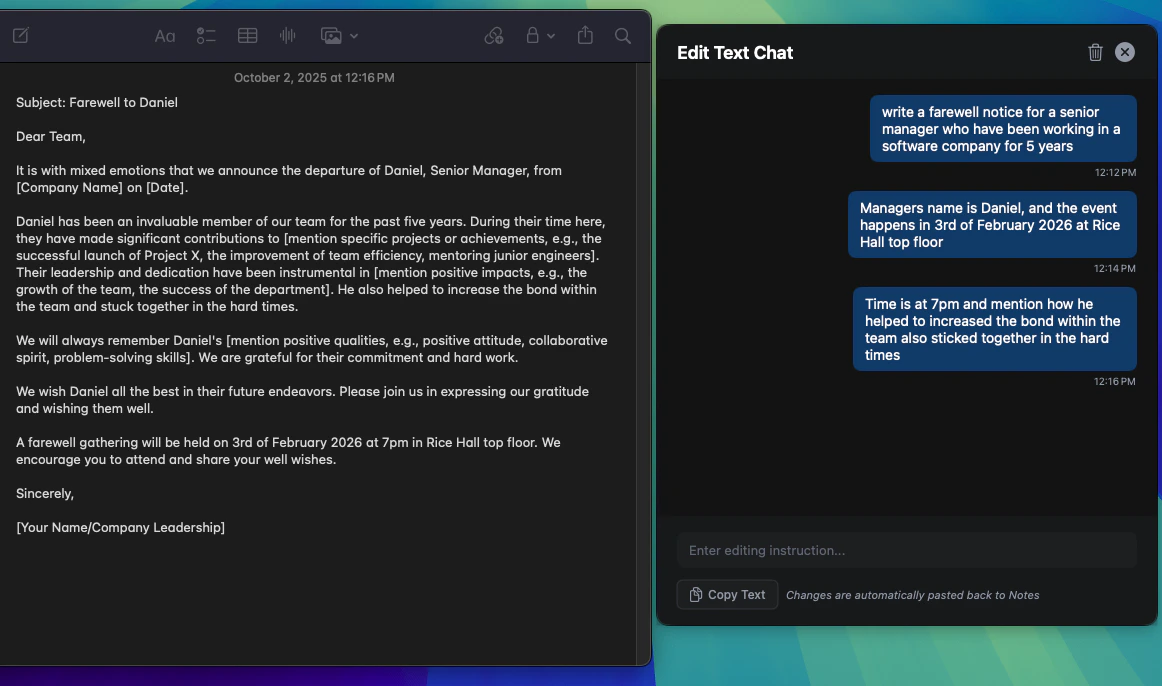
Transform any text through iterative editing with Text Weaver. Start any instruction with `@edit` to open the edit chat, allowing you to refine and improve text through collaborative editing sessions.

<Frame caption="Text Weaver initialization with @edit command.">
  <img src="https://mintcdn.com/logical-257522b6/5VAMFRe1sL8A7hXh/images/additional-features/text-weave-init.png?fit=max&auto=format&n=5VAMFRe1sL8A7hXh&q=85&s=75324da6103bd183e66264d73410554c" alt="Logical Text Weaver showing @edit command interface and initialization." width="643" height="80" data-path="images/additional-features/text-weave-init.png" />
</Frame>

<Frame caption="Text Weaver in action with iterative editing capabilities.">
  <img src="https://mintcdn.com/logical-257522b6/5VAMFRe1sL8A7hXh/images/additional-features/text-weaver.png?fit=max&auto=format&n=5VAMFRe1sL8A7hXh&q=85&s=5afa616fe5e3ffbf49399a1153531abf" alt="Logical Text Weaver displaying collaborative text editing interface with iterative improvements." width="1162" height="686" data-path="images/additional-features/text-weaver.png" />
</Frame>
